
Engine
Manifest, resources, and files
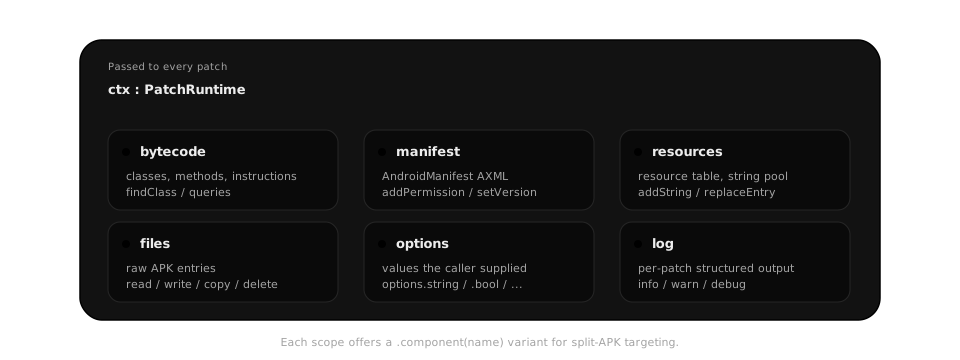
Besides bytecode, a patch can edit the manifest, the resource table, and any file in the APK. Inside execute { } they are manifest, resources, and files, next to bytecode for raw class lookup, options, and log.
manifest.addPermission("android.permission.INTERNET")
manifest.addActivity("app.example.SettingsActivity") { this["android:label"] = "Settings" }
manifest.edit {
    val application = findByTag("application").first()
    application.appendChild(createElement("meta-data").apply { this["android:name"] = "reseam" })
}

resources.addString("reseam_label", "Reseam")
val label = resources.id("string", "app_name")

files.write("assets/reseam/logo.png", bytes)
files.copy("resources/logo.png", "assets/logo.png")

bytecode.replaceAllStrings("com.example", newPackage)
bytecode.redirectCalls("android.telephony.TelephonyManager", "getDeviceId", Identity.deviceId)
log.info("renamed package")
redirectCalls sends every call to a method anywhere in the app to a static extension method instead, passing the receiver as the first argument for instance methods. It is the primitive for patches that apply to any app: identity spoofing, blocking a library call, replacing a platform API. Identity.deviceId above is declared as static("deviceId", "android.telephony.TelephonyManager", returns = Type.String).
edit { } opens the manifest as an XML document and closes it after the block; files.editXml(path) { } does the same for any XML entry. Every member is listed in the reference.
Warning
Elements from edit { } are handles into a document that closes with the block. Take strings and ids out, never an XmlElement. Release builds often strip resource names, so resources.id("string", "app_name") can be null for a resource that exists; take the id from where the app refers to it (resourceRef on a manifest attribute) and work through replaceEntry.
Split APKs
for (component in manifest.components()) {
    manifest.component(component).edit { root["package"] = newPackage }
}manifest, resources, and files take component(name) for one split; without it they act on the base. A package or version change must land in every component, or the split set will not install.
Next: Reading obfuscated objects.